Downloads BlueNAC-3000
Drivers
- Download the corresponding drivers (how to check your system):
 [32bit Drivers]
[64bit Drivers] - Install the drivers in the computer following the instructions of the installer.
- Attention: In some cases in Windows 7 64bits, in order to install unsigned drivers it is necessary to restart the system in a specific way. To do this, restart the computer and before Windows starts, press the F8 key for advanced system options and select "Disable Driver Signature Enforcement". Once the operating system is loaded normally we can install the BlueNAC-3000 drivers.

- Connect the device to the computer via USB.
- In Windows XP the wizard for new hardware will open automatically, we select not connect with Windows Update to search for drivers, in the next step, in the Windows Update options, select "Not this time". The wizard asks for the path to the drivers, select "Install from a list or specific location (Advanced)" and continue. In the next step, option "Don’t search. I will choose the driver to install" and choose the NAC-Intercom BlueNAC3000 device. . It is possible that at this point we warn that the driver is not digitally signed (has not passed the test of the Windows logo), accept and continue with the installation.
- En Windows Vista/7 the system automatically recognizes the device as "Generic BT adapter" and it is necessary to change the drivers that Windows applies by default. In the start menu of the taskbar of the desktop (windows logo), look to the right for the text "Computer" and click with the right mouse button on "Manage", this will take us to a window of administration of our computer, where we have to locate "Device Management". When you click, you will see all the devices on your computer, and in the "BT radios" section you can find "Generic BT adapter". Click with the right button and select "Update driver software ..."

In the window , select the option "Search for driver software on the computer" and then "Choose from a list of device drivers on the computer". Here we can locate the Nac-Intercom BlueNac3000 de la lista, lo seleccionamos y pulsamos "Siguiente". from the list, select it and click "Next". It is possible that at this point we warn that the driver is not digitally signed (has not passed the test of the Windows logo), continue with the installation anyway.
- You are ready now to use our software on your computer.
- More step by step details in our driver installation manuals:
 Installing drivers in Windows XP
Installing drivers in Windows Vista/7
Updater
The BlueNAC-3000 DFU updater is a software used to update your device with the latest improvements developed in NAC-Intercom.
The operation is very simple: Download and install the «BlueNAC-3000 DFU updater» software and the update files corresponding to your device (Pilot/Copilot or RadioLink).


Configurator
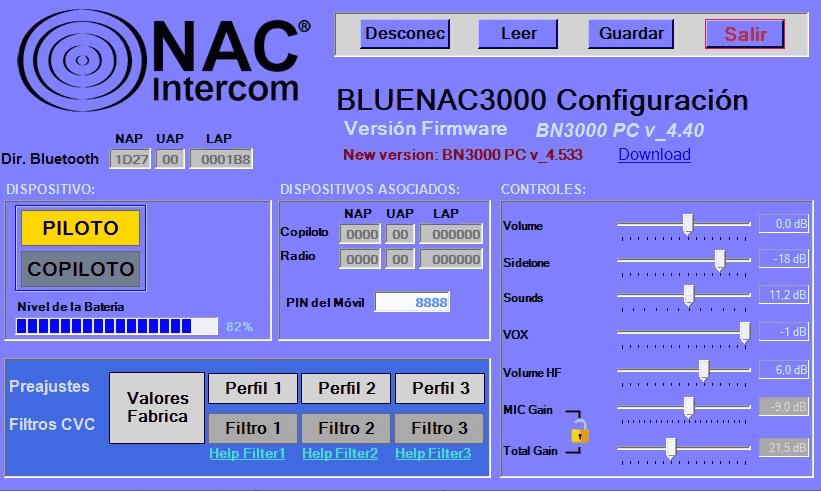
For a more comfortable management of the volumes of your BlueNAC-3000 device, we have developed a software that allows you to view the configuration of your device, simply by connecting it to your computer via USB. The operation is very simple, once downloaded and installed the software (and having previously installed the drivers correctly on the computer), pressing Connect button, you can:
- Read/Modify the values of volumes
- Read the battery status
- Modify audio filters
- Check the firmware version of the device
- ... and lot more!
Drivers
The drivers for BlueNAC-3000 devices work natively on Windows 8 and Windows 10 starting with the manufacturing serial number BN0001CA for Pilot/Copilot devices, and the manufacturing serial number RL0F431A for RadioLink devices. (products purchased as of 06/11/2017).
To check if your serial number is from an older device, fill in the following fields:

For old devices it is necessary to change some values of the board before being able to use them in a system with Windows 8 or Windows 10. Unfortunately to use this program, it is first necessary to have access to a computer with a previous windows and with the drivers for BlueNAC-3000 devices installed
Steps
- Access a computer with a Windows XP, Vista or 7 operating system
- Download the corresponding drivers (how to check your system):
[32bit Drivers]
[64bit Driver] - Follow the steps in our driver installation manuals:
- With the device connected via USB, run the program to change the plate values (no installation is necessary):
[BN3000 PSKEY change] - After running the program, the BlueNAC-3000 device will be ready for use on Windows 8/10 systems. From here follow the instructions of "New Devices"
- Download the corresponding drivers (how to check your system):
[32bit Driver]
[64bit Driver] - Follow the steps in our driver installation manual:
Installation of drivers in Windows8/10 - Connect the device and allow Windows to recognize it. It may take more or less depending on your system.
- You are now ready to install and use our software on your computer.
Updater
The BlueNAC-3000 DFU updater is a software used to update your device with the latest improvements developed in NAC-Intercom.
Is very simple: Download and install the «BlueNAC-3000 DFU updater» software and the update files corresponding to your device (Pilot/Copilot or RadioLink module).
Configurador
For a more comfortable management of the volumes of your BlueNAC-3000 device, we have developed a software that allows you to view the configuration of your device, simply by connecting it to your computer via USB. The operation is very simple, once downloaded and installed the software (and having previously installed the drivers correctly on the computer), pressing Connect button, you can:
- Read/Modify the values of volumes
- Read the battery status
- Modify audio filters
- Check the firmware version of the device
- ... and lot more!
User Guides
- BlueNAC-3000 Pilot/Copilot [Spanish]
- BlueNAC-3000 Piloto/Copiloto [English]
- BlueNAC-3000 Pilot/Copilot [French]
- BlueNAC-3000 RadioLink [Spanish]
- BlueNAC-3000 RadioLink [English]
- BlueNAC-3000 Moto [Spanish]
- BlueNAC-3000 Moto [English]
Installation Guides
- Driver Installation Windows XP [Spanish]
- Driver Installation Windows XP [English]
- Driver Installation Windows VISTA/7 [Spanish]
- Driver Installation Windows VISTA/7 [English]
- Firmware Updater Software [Spanish]
- Firmware Updater Software [English]
- BlueNAC-3000 Configurator Guide [Spanish]
- BlueNAC-3000 Configurator Guide [English]